Residential Proxies · Hands-On Test & Guide
2extract Review 2026: $3.99/GB Residential Proxies, Setup Tutorial & AI MCP Guide
Quick verdict
2extract is a clean pick for scrapers, local Google SERP audits, anti-detect browsers, and AI agents. Residential IPs start at $3.99/GB under 25 GB. Self-serve volume tiers hit $2.99/GB at 100 GB ($299) and $1.20/GB at 1 TB. Quotes at 10 TB+ start from $0.70/GB. Mobile IPs start at $4.99/GB under 25 GB, with a $10 non-expiring deposit. All targeting lives inside your username, with ready-made MCP docs for Claude Code, Cursor, and Codex.
In our November 19 two-window retest, all 30 proxied requests returned HTTP 200 with a 3.051-second median speed. Every -country-us check landed on real U.S. home broadband networks across two IP lookup tools, and all 6 sticky calls held their assigned exit IPs. Keep four catches in mind: two of four earlier warm-up runs failed with CONNECT 500 errors, and home broadband hops run 2 to 4 seconds slower than datacenter servers. Top-ups past $50 also trigger Didit ID checks, while mobile IPs and live MCP runs were not tested here.
1. What 2extract actually does (and how it differs from a VPN or datacenter proxy)
Short answer: A consumer VPN routes one human laptop or phone through shared server farms for a flat monthly fee. 2extract routes scripts and AI tools through real home Wi-Fi from $3.99/GB under 25 GB. Volume drops to $2.99/GB at 100 GB, while mobile starts at $4.99/GB via proxy.2extract.net:5555.
New buyers often ask if a $5 VPN app solves the same job. In real workloads, three technical traits set them apart.
| Comparison point | Consumer VPN ($3–$10/mo) | Datacenter Proxy ($1–$2/GB) | 2extract Residential Proxy ($3.99/GB) |
|---|---|---|---|
| IP origin & trust score | Shared hosting/VPS servers easily recognized by retail and search WAFs | Fast cloud ASN ranges; frequently rate-limited on Amazon, Google, or ticketing sites | Real residential ISPs (Comcast, AT&T, Verizon, Charter, TalkTalk verified live) |
| Concurrency & rotation | One country and one exit IP across your entire OS at a time | Fixed server IP lists; manual rotation setup per thread | Per-request IP rotation by default, or parallel -session- locking per worker |
| Integration footprint | Desktop/mobile client rewrites your whole computer's routing table | Configured inside app or scraper settings | Zero local install—routes only the target script, headless browser, or AI job |
| Location precision | Country or select metro gateways | Hosting facility regions only | Country, state, city, ZIP, ASN, OS (-os-), or mobile carrier (-isp-) in the username |
| Bandwidth economics | Unlimited GB—built for streaming video, privacy, and everyday browsing | Low unit cost for bulk media or tolerant targets | Pay per GB: 3 GB of HD video burns ~$12, whereas 1,000 raw HTML/API checks (< 5 MB) cost ~$0.02 |
2. Step-by-step tutorial: $10 wallet to country & sticky routing in 3 minutes
Short answer: Add $10 to your shared wallet and lock a daily usage cap on your proxy. Point your code at proxy.2extract.net:5555, then put country or sticky rules straight inside the username.
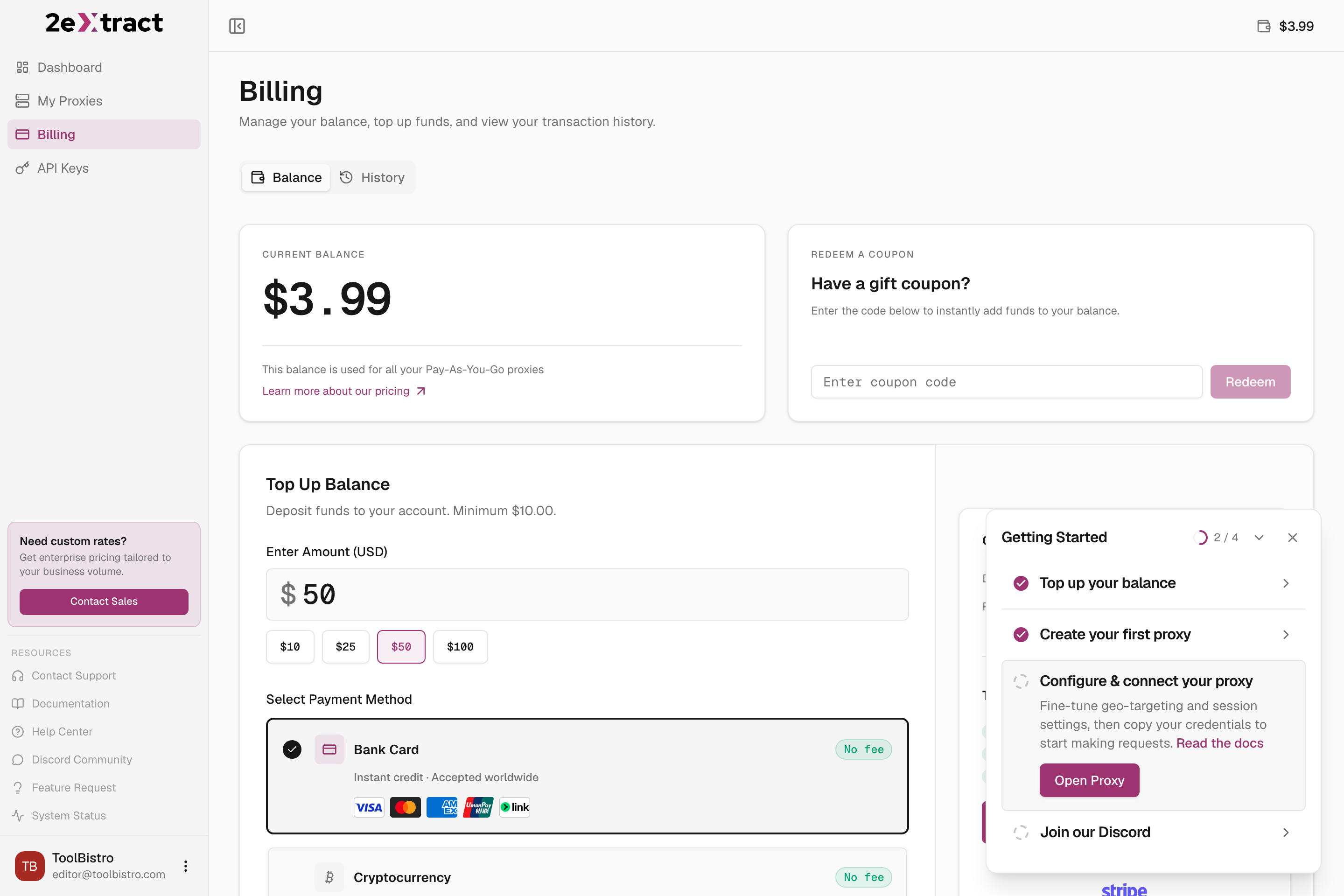
Step 1: Fund your shared Pay-As-You-Go wallet ($10 minimum, never expires)
Open Billing at 2extract.com/app/billing. One wallet balance pays for all residential and mobile proxies with zero monthly seat fees. You can top up from $10.00 using a bank card via Stripe or 50+ coins like BTC, ETH, USDT, and LTC. Checkout adds zero processing fees, and deposits never expire. Keep two documented limits in mind: there is no free trial before adding $10, and total top-ups past $50 require Didit ID and selfie checks.
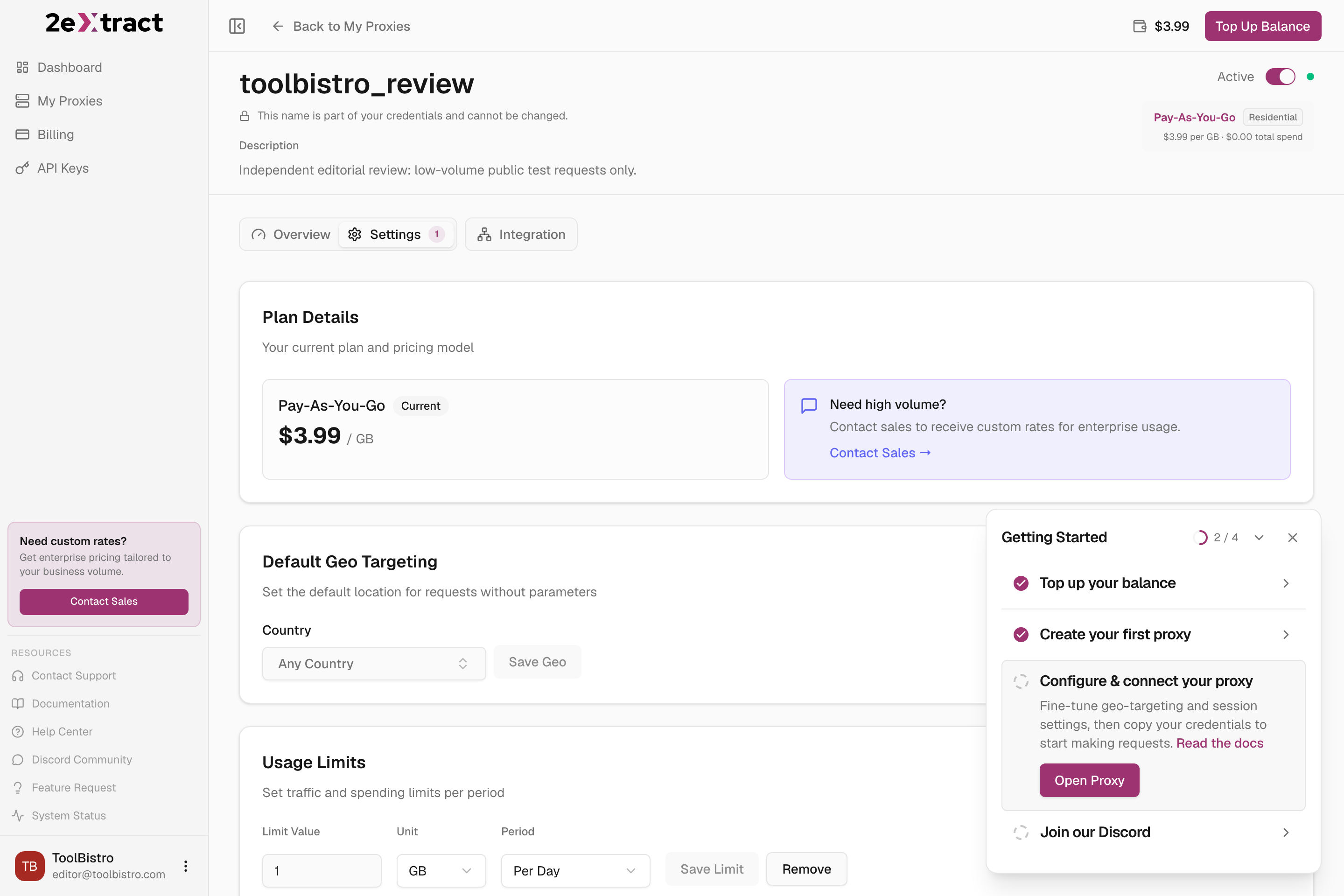
Step 2: Create a proxy resource and lock a daily spend or GB cap first
Open My Proxies and create a residential proxy. Use lowercase letters, digits, and underscores only, such as toolbistro_review. Never put hyphens in a proxy name, because hyphens split routing flags later and names lock permanently after setup. Next, open Settings and set a hard daily or monthly ceiling. We locked toolbistro_review to 1 GB per day, which sends an alert at 80% and stops runaway loops automatically. You can also restrict Allowed IPs or limit Allowed Targets to domains like *.example.com.
Step 3: Configure targeting via username parameters (cURL, Python & browser profiles)
One proxy handles every country on the network. Just add targeting flags after your base username from the Overview tab instead of managing separate ports per market:
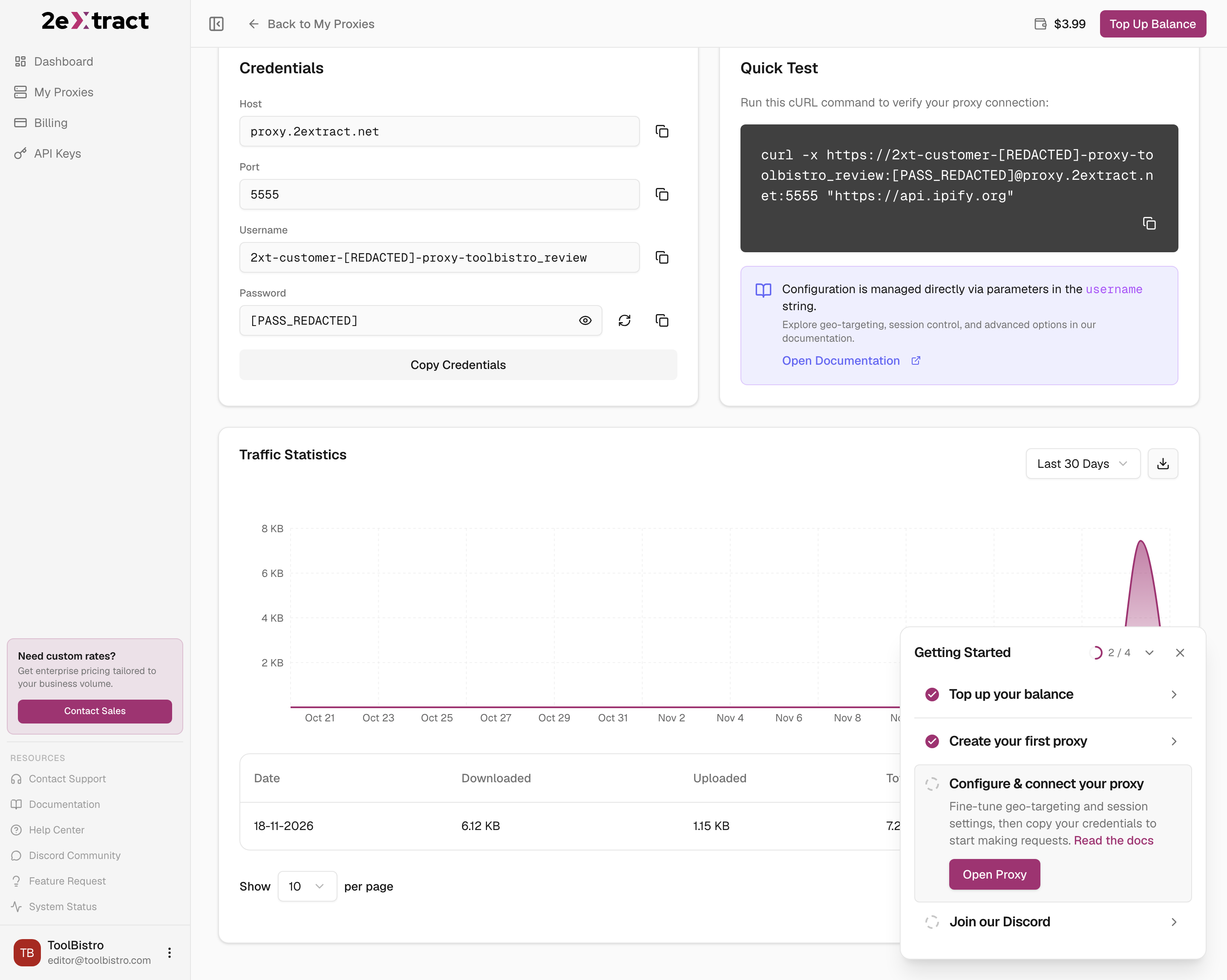
# 1) Default rotating IP (new residential exit on every HTTP request)
curl --proxy "https://proxy.2extract.net:5555" \
  --proxy-user "2xt-customer-[REDACTED]-proxy-toolbistro_review:[PASS_REDACTED]" \
  "https://api.ipify.org"

# 2) U.S. city target + 10-minute sticky session + strict fail mode (-const)
curl --proxy "https://proxy.2extract.net:5555" \
  --proxy-user "2xt-customer-[REDACTED]-proxy-toolbistro_review-country-us-state-california-city-losangeles-session-run01-time-10-const:[PASS_REDACTED]" \
  "https://api.ipify.org"
import requests

username = "2xt-customer-[REDACTED]-proxy-toolbistro_review-country-us-session-job01-time-10"
password = "[PASS_REDACTED]"
proxy_url = f"https://{username}:{password}@proxy.2extract.net:5555"

resp = requests.get(
    "https://www.toolbistro.com/cdn-cgi/trace",
    proxies={"http": proxy_url, "https": proxy_url},
    timeout=20,
)
print(resp.status_code, resp.text)
Anti-detect browser note: Official docs cover Dolphin Anty, Multilogin, AdsPower, GoLogin, Octo Browser, and Kameleo. Pick HTTP or SOCKS5 and add a sticky username like ...-session-prof01-time-30. Paste the /change_ip URL from the Integration tab into your browser profile to swap IPs with one click.
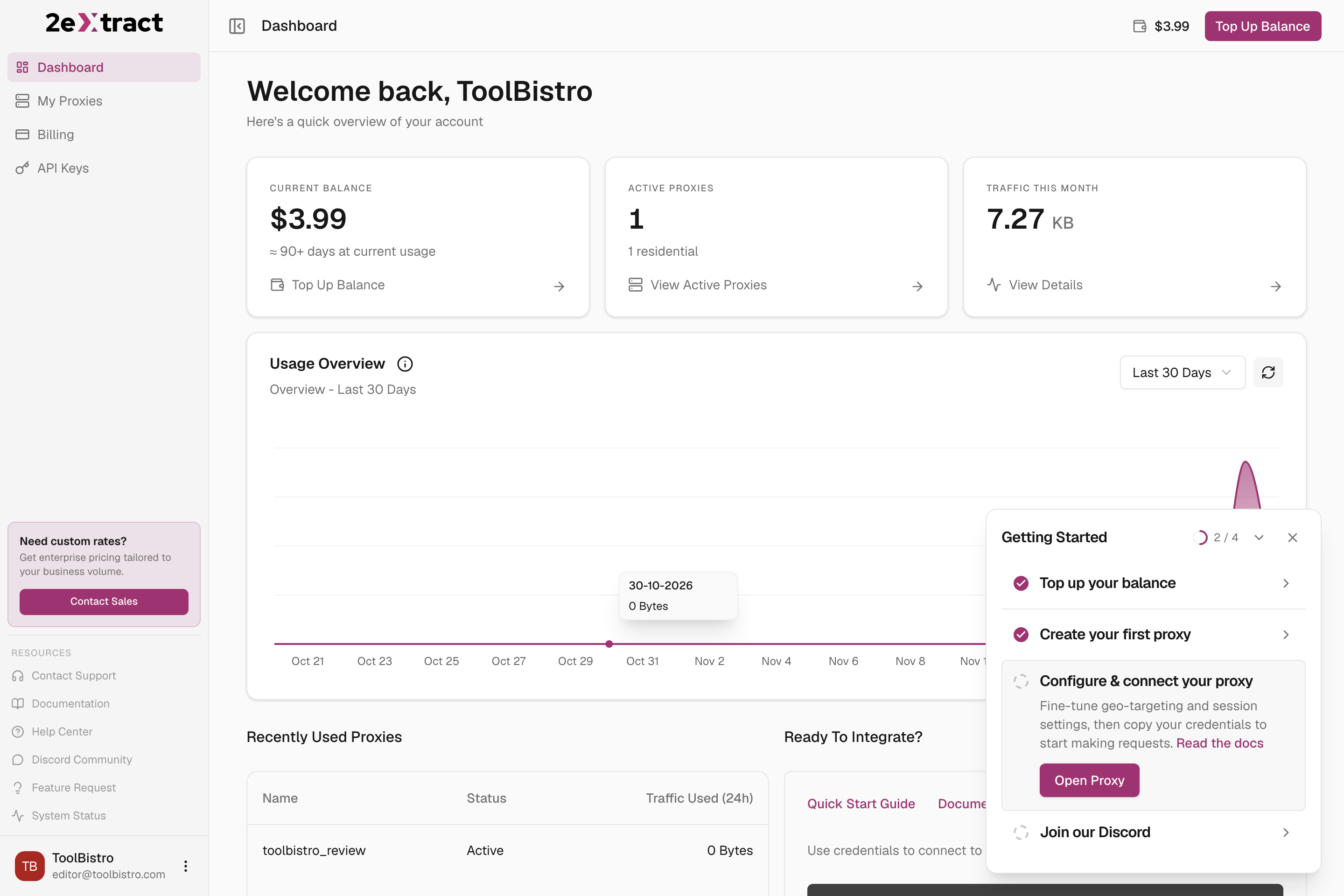
Step 4: Monitor traffic rollups and read X-Proxy-Error headers cleanly
Use the Dashboard for wallet balance and quick totals. Open My Proxies → Overview to inspect daily download, upload, and spend rows. If a call fails, read the response headers before changing your code. Seeing X-Proxy-Error points to a gateway or exit-node error. Code 211–224 just needs a retry, code 220 means your city filter is too narrow, and code 242 means a strict -const node dropped offline. By contrast, a 403 or 429 without X-Proxy-Error means the target website blocked that exit IP.
3. Six practical tips to cut proxy bandwidth spend and avoid setup traps
Short answer: At $3.99 per GB, blocking heavy page assets and keeping session flags tidy makes a $10 top-up go five times further:
- 1. Abort images, fonts, CSS, and video in headless browsers: A full retail page downloads 2–4 MB per load, burning $10 in roughly 850 visits. Stripping assets or fetching raw JSON keeps calls under 80 KB, stretching $10 past 30,000 requests.
- 2. Always pair a new country with a new
-session-ID: 2extract locks your location onto the session name on the very first call. Changing-country-usto-country-dewithout renaming the session stays stuck in the U.S. - 3. Keep geo flags separate from network flags: Mixing
-country-uswith-asn-7922or mobile-isp-throws a400 parameter conflicterror. However, you can add-os-windows,-os-macos, or mobile OS tags alongside either group. - 4. Pass credentials via
--proxy-useror encode special symbols: Symbols like@,:, or/inside passwords break standard proxy URLs unless escaped or passed separately. - 5. Choose
HTTPSoverSOCKS5for web scraping: Docs reserveSOCKS5for raw TCP, QUIC, or WebRTC. StandardHTTPSencrypts your hop toproxy.2extract.net:5555cleanly for web jobs. - 6. Ignore a minor FAQ typo on the homepage: One FAQ mentions
Project-A, yet technical docs forbid hyphens in proxy names. Always use underscores likeproject_ainstead.
4. Two-window benchmark results: latency, dual GeoIP accuracy & failures
Short answer: Earlier warm-up checks hit two CONNECT tunnel failed 500 errors out of four. In our November 19 retest, however, all 30 proxied requests returned HTTP 200 with a 3.051-second median speed. Every -country-us check matched U.S. networks on two IP databases, and all 6 sticky runs held their IPs.
We ran Window 1 at 17:50 and Window 2 at 17:55 UTC+8. Every probe hit our own trace endpoint at toolbistro.com/cdn-cgi/trace with a 15-second connect limit and a 20-second max timeout. Each window started with one direct baseline request using no proxy. All 30 proxied runs downloaded 6,746 payload bytes in total, and each exit IP was verified against both ipinfo.io and ipwho.is.
| Test group (T1 + T2) | Samples | HTTP 200 | Median | Min–Max | Exits, ASNs & GeoIP consensus |
|---|---|---|---|---|---|
Direct baseline (noproxy) |
2 | 2 / 2 | 0.788 s | 0.638–0.938 s | Local client origin (CN) |
| Default rotating | 10 | 10 / 10 | 3.290 s | 2.690–9.247 s | 10 unique exits across 7 countries (GB, FI, NO, FR, TR, PL, ES) |
U.S. rotating (-country-us) |
10 | 10 / 10 | 2.873 s | 2.481–4.385 s | 10 unique U.S. exits; 10 / 10 agreed US across both GeoIP lookups |
| T1 sticky S1 + controls | 4 + 4 | 8 / 8 | 3.008 s / 2.992 s | 2.485–4.183 s | 4 / 4 sticky pinned to exit-11 (Charter SC); 4 / 4 controls rotated (exit-12..15) |
| T2 sticky S2 | 2 | 2 / 2 | 4.489 s | 4.080–4.897 s | 2 / 2 pinned to exit-26 (Tillman FiberCo FL) |
Gateway TCP connect (~130 ms) vs. full residential round-trip (3.051 s median)
Some online reviews describe 2extract residential speeds as "400–450 ms." Raw curl phase timings explain why numbers diverge. Opening the initial TCP hop to proxy.2extract.net:5555 was fast, averaging 0.167 s with a 0.130 s median. Yet completing full TLS handshakes through distant home broadband modems took 1.924 s to 8.546 s. That brings real-world HTTPS round-trips to a 3.051 s median, with one Turkish exit hitting 9.247 s. Plan for 2.5 to 4.5 seconds per cold HTTPS fetch.
Honest failure notes, outliers, and scope guardrails
- Unexplained warm-up 500s: Early ad-hoc runs logged two
CONNECT tunnel failed 500errors out of four, alongside ~4.30 s and ~4.90 s passes. We did not capture error headers during those first runs, so the root cause stays unknown. Build automatic retries into your scripts. - Real home ISPs & one state mismatch: All 20 U.S. runs landed on real telecom providers like Comcast, Charter, AT&T, Verizon, CenturyLink, Cox, Tillman FiberCo, and Jackson County REMC. Only
exit-15split at state level—ipinfo.iolisted Indiana whileipwho.islisted Kentucky—while every tool agreed on countryUS. - Wallet balance & delayed usage charts: Billing History logged our
+$4.00Pay-As-You-Go balance on November 18. That wallet is separate from our1 GB/dayproxy cap. Header balance read$3.99after 7.27 KB on November 18, and charts did not yet reflect November 19 test bytes two minutes after T2 ended. - Small-sample limit: Thirty test runs prove basic routing and sticky stability. They do not prove homepage claims of
10M+ IPs, a~99% success rate, or249countries, especially since Billing lists195+countries.
Full 32-probe verification log (T1 + T2 raw timings, redacted exit IDs & dual GeoIP check)
Every probe below targeted https://www.toolbistro.com/cdn-cgi/trace (15 s connect / 20 s max timeout; 6,746 total proxied payload bytes across 30 calls) on November 19, 2026 (UTC+08:00 timestamps; exit IPs replaced by HMAC-SHA256 tokens exit-01–exit-26; countries checked independently on ipinfo.io, ipwho.is, and Cloudflare edge).
| # | Win | Time (+08) | Suffix | CONNECT/HTTP | TCP Conn | TLS Handshake | Total | Bytes | Exit | ASN / ISP | Dual GeoIP |
|---|---|---|---|---|---|---|---|---|---|---|---|
| 1 | T1 | 2026-11-19 17:50:27 | (direct) | 000/200 | 0.498 s | 0.713 s | 0.938 s | 245 B | local-direct | — | Local Direct Control (cf_loc=CN) |
| 2 | T1 | 2026-11-19 17:50:30 | default | 200/200 | 0.372 s | 3.790 s | 4.384 s | 224 B | exit-01 | AS13285 TalkTalk Communications Limited | Matched: GB |
| 3 | T1 | 2026-11-19 17:50:37 | default | 200/200 | 0.126 s | 2.284 s | 2.779 s | 223 B | exit-02 | AS202246 Valoo Oy | Matched: FI |
| 4 | T1 | 2026-11-19 17:50:43 | default | 200/200 | 0.246 s | 2.675 s | 3.248 s | 221 B | exit-03 | AS3215 Orange S.A. | Matched: FR |
| 5 | T1 | 2026-11-19 17:50:50 | default | 200/200 | 0.240 s | 8.546 s | 9.247 s | 220 B | exit-04 | AS47331 TTNet A.S. | Matched: TR |
| 6 | T1 | 2026-11-19 17:51:02 | default | 200/200 | 0.119 s | 2.401 s | 3.332 s | 221 B | exit-05 | AS13285 TalkTalk Communications Limited | Matched: GB |
| 7 | T1 | 2026-11-19 17:51:09 | -country-us | 200/200 | 0.130 s | 2.587 s | 2.972 s | 220 B | exit-06 | AS209 CenturyLink Communications, LLC | Matched: US |
| 8 | T1 | 2026-11-19 17:51:16 | -country-us | 200/200 | 0.123 s | 2.178 s | 2.567 s | 253 B | exit-07 | AS12271 Charter Communications Inc | Matched: US |
| 9 | T1 | 2026-11-19 17:51:22 | -country-us | 200/200 | 0.129 s | 2.287 s | 2.875 s | 223 B | exit-08 | AS701 Verizon Business | Matched: US |
| 10 | T1 | 2026-11-19 17:51:28 | -country-us | 200/200 | 0.140 s | 2.345 s | 2.870 s | 219 B | exit-09 | AS7922 Comcast Cable Communications, LLC | Matched: US |
| 11 | T1 | 2026-11-19 17:51:34 | -country-us | 200/200 | 0.116 s | 2.196 s | 2.625 s | 222 B | exit-10 | AS10796 Charter Communications Inc | Matched: US |
| 12 | T1 | 2026-11-19 17:51:41 | -country-us-session-tbrev01-time-10 | 200/200 | 0.145 s | 3.522 s | 4.183 s | 229 B | exit-11 | AS11426 Charter Communications Inc | Matched: US |
| 13 | T1 | 2026-11-19 17:51:48 | -country-us | 200/200 | 0.133 s | 2.148 s | 3.155 s | 227 B | exit-12 | AS31875 Jackson County Rural Electric Membership Corporation | Matched: US |
| 14 | T1 | 2026-11-19 17:51:55 | -country-us-session-tbrev01-time-10 | 200/200 | 0.261 s | 2.442 s | 3.243 s | 229 B | exit-11 | AS11426 Charter Communications Inc | Matched: US |
| 15 | T1 | 2026-11-19 17:51:59 | -country-us | 200/200 | 0.133 s | 2.285 s | 2.829 s | 222 B | exit-13 | AS11351 Charter Communications Inc | Matched: US |
| 16 | T1 | 2026-11-19 17:52:06 | -country-us-session-tbrev01-time-10 | 200/200 | 0.117 s | 1.924 s | 2.485 s | 229 B | exit-11 | AS11426 Charter Communications Inc | Matched: US |
| 17 | T1 | 2026-11-19 17:52:10 | -country-us | 200/200 | 0.247 s | 2.673 s | 3.430 s | 221 B | exit-14 | AS7922 Comcast Cable Communications, LLC | Matched: US |
| 18 | T1 | 2026-11-19 17:52:16 | -country-us-session-tbrev01-time-10 | 200/200 | 0.126 s | 1.999 s | 2.774 s | 229 B | exit-11 | AS11426 Charter Communications Inc | Matched: US |
| 19 | T1 | 2026-11-19 17:52:21 | -country-us | 200/200 | 0.123 s | 2.278 s | 2.692 s | 220 B | exit-15 | AS7018 AT&T Enterprises, LLC | Matched: US |
| 20 | T2 | 2026-11-19 17:55:35 | (direct) | 000/200 | 0.203 s | 0.419 s | 0.638 s | 250 B | local-direct | — | Local Direct Control (cf_loc=CN) |
| 21 | T2 | 2026-11-19 17:55:37 | default | 200/200 | 0.247 s | 2.752 s | 3.423 s | 220 B | exit-16 | AS12741 Netia SA | Matched: PL |
| 22 | T2 | 2026-11-19 17:55:44 | default | 200/200 | 0.129 s | 2.638 s | 3.131 s | 221 B | exit-17 | AS2119 Telenor Norge AS | Matched: NO |
| 23 | T2 | 2026-11-19 17:55:51 | default | 200/200 | 0.119 s | 2.211 s | 2.690 s | 222 B | exit-18 | AS29695 Lyse Tele AS | Matched: NO |
| 24 | T2 | 2026-11-19 17:55:58 | default | 200/200 | 0.124 s | 2.297 s | 2.789 s | 222 B | exit-19 | AS719 Elisa Oyj | Matched: FI |
| 25 | T2 | 2026-11-19 17:56:04 | default | 200/200 | 0.247 s | 3.171 s | 4.033 s | 223 B | exit-20 | AS200845 AVATEL TELECOM, SA | Matched: ES |
| 26 | T2 | 2026-11-19 17:56:11 | -country-us | 200/200 | 0.249 s | 3.437 s | 4.385 s | 223 B | exit-21 | AS33363 Charter Communications, Inc | Matched: US |
| 27 | T2 | 2026-11-19 17:56:19 | -country-us | 200/200 | 0.118 s | 2.053 s | 2.481 s | 222 B | exit-22 | AS10796 Charter Communications Inc | Matched: US |
| 28 | T2 | 2026-11-19 17:56:25 | -country-us | 200/200 | 0.120 s | 2.203 s | 2.906 s | 219 B | exit-23 | AS22773 Cox Communications Inc. | Matched: US |
| 29 | T2 | 2026-11-19 17:56:32 | -country-us | 200/200 | 0.128 s | 2.196 s | 2.712 s | 227 B | exit-24 | AS7922 Comcast Cable Communications, LLC | Matched: US |
| 30 | T2 | 2026-11-19 17:56:38 | -country-us | 200/200 | 0.235 s | 2.739 s | 3.561 s | 247 B | exit-25 | AS7922 Comcast Cable Communications, LLC | Matched: US |
| 31 | T2 | 2026-11-19 17:56:44 | -country-us-session-tbrev02-time-10 | 200/200 | 0.137 s | 2.925 s | 4.897 s | 222 B | exit-26 | AS53366 TILLMAN FIBERCO, LLC | Matched: US |
| 32 | T2 | 2026-11-19 17:56:53 | -country-us-session-tbrev02-time-10 | 200/200 | 0.125 s | 2.060 s | 4.080 s | 226 B | exit-26 | AS53366 TILLMAN FIBERCO, LLC | Matched: US |
5. Can AI agents call 2extract directly? Claude Code, Cursor & Codex MCP guide (documented only)
Short answer: Yes. Native MCP support lets AI assistants look up city codes, check wallet funds, build spend-capped proxies, and return ready proxy strings via https://mcp.2extract.com/mcp. Teams using Claude Code or Codex and Cursor can also mount a free Docs MCP at https://docs.2extract.com/mcp with no API key. Status note: audited from official docs on November 19, 2026; not live-tested in this review.
# Full account + proxy orchestration MCP (Streamable HTTP + Bearer token)
claude mcp add --transport http 2extract https://mcp.2extract.com/mcp \
  --header "Authorization: Bearer 2xt_YOUR_API_KEY"

# Zero-key read-only Docs MCP (safe to attach before sharing any account key)
claude mcp add --transport http 2extract-docs https://docs.2extract.com/mcp
MCP tools, 4 slash prompts, and two critical key-permission rules (from Nov 19 docs)
- Supported clients & auth split: Docs provide configs for Claude Code, Claude Desktop, Cursor, VS Code (prompted
${input:2extract-key}), Codex, Gemini CLI, Windsurf, and Cline. MCP usesAuthorization: Bearer 2xt_..., whereas the REST API usesX-API-Key: 2xt_.... - 5 independent scopes (
proxies:writeexcludesproxies:read): API tokens grantproxies:read,proxies:write,balance:read,stats:read, andgeo:readseparately. Always grant both read and write together, and note thatsetProxyIpWhitelist/setProxyTargetHostsoverwrite the full list unless the agent reads first. - Built-in prompts & client-side guardrails: Ships with
create-proxy-resource,build-connection-string,monthly-cost-report, andcleanup-unused-proxies. Destructive tools (deleteProxyResource,regenerateProxyPassword) rely on client confirmation rather than server blocks—always enforce daily proxy caps and modest balances before delegating live keys.
6. Is $3.99/GB expensive? 2026 starter vs. volume tiers & top alternatives
Short answer: Under 25 GB, 2extract charges $3.99/GB. That beats Bright Data, Oxylabs, and IPRoyal list rates by 45% to 53%, while matching Decodo without expiry. Rates drop to $3.59/GB at 25 GB, $2.99/GB at 100 GB ($299), and $1.20/GB at 1 TB. Custom quotes start from $0.70/GB at 10 TB+, while budget ~$1/GB pools cost less under 1 TB.
Official residential volume tiers (never expire): Discounts step down automatically above 25 GB, with 10 TB+ quoted directly.
| Tier | <25 GB | 25 GB+ | 50 GB+ | 100 GB+ | 250 GB+ | 500 GB+ | 1 TB+ | 2 TB+ | 5 TB+ | 10 TB+ |
|---|---|---|---|---|---|---|---|---|---|---|
| Per GB | $3.99 | $3.59 | $3.29 | $2.99 ($299) | $2.29 | $1.69 | $1.20 | $1.05 | $0.95 | from $0.70 (custom) |
| Provider (2026 Public Pricing) | Starter PAYG (<25 GB) | 100 GB / High-Volume Tiers | Balance / Data Expiry | Competitive takeaway vs. 2extract |
|---|---|---|---|---|
| 2extract | $3.99/GB ($4.99 mobile; $10 min) | $2.99/GB at 100 GB ($299); $1.20 at 1 TB; from $0.70 at 10 TB+ quote | Never expires | No-expiry PAYG from $10 starter tests through self-serve 100 GB–5 TB tiers + MCP |
| Bright Data | ~$8.00–$8.40/GB list (~$4 promos) | ~$5.00–$6.00+/GB mid-tier monthly commits | Expires monthly | Enterprise unblocker depth, ~2× higher list cost with monthly quota expiry |
| Oxylabs | $6.00–$8.00/GB ($30/mo = 5 GB) | ~$4.00–$4.50/GB around 100 GB/mo | Expires monthly | Strong enterprise suite, roughly 1.3×–2× costlier at both entry and 100 GB |
| Decodo (Smartproxy) | $4.00/GB PAYG | ~$3.00/GB at 100 GB/mo ($2.75+ higher commits) | Expires monthly | Nearly tied at both <25 GB and 100 GB ($299 vs. ~$300/mo), while 2extract never expires |
| IPRoyal | ~$7.00–$7.35/GB starter | ~$2.45–$3.50/GB (100–200 GB packs; $1.75 multi-TB) | Never expires | Same non-expiring model, ~45% costlier under 25 GB and similar around 100 GB |
| DataImpulse / Evomi | $0.99–$1.00/GB PAYG ($5+ min) | ~$99–$100 at 100 GB ($0.49/GB Evomi monthly) | PAYG never expires | ~3× cheaper at 100 GB ($99–$100 vs. $299); gap narrows to $0.95–$1.20/GB on 2extract at 1–5 TB |
Head-to-head: 2extract vs. top alternatives
2extract vs. Decodo: Under 25 GB, both charge ~$3.99 to $4.00/GB, and at 100 GB 2extract's self-serve $2.99/GB ($299) matches Decodo's ~$3.00/GB monthly tier. Pick 2extract if your traffic fluctuates so unused GB never expire at month-end, or pick Decodo for bundled scraping APIs.
2extract vs. IPRoyal: Both keep Pay-As-You-Go traffic active with no expiry. Pick 2extract for cheaper starter runs under 25 GB ($3.99/GB vs. ~$7.35/GB). Self-serve rates also drop to $2.99/GB at 100 GB ($299) and $1.20/GB at 1 TB. Pick IPRoyal if you need datacenter or static ISP proxies.
2extract vs. DataImpulse & Evomi: At 100 GB, 2extract drops to $2.99/GB ($299 total). That compares against ~$99 to $100 on DataImpulse ($1/GB) or Evomi ($0.99/GB PAYG, $0.49/GB monthly). Budget pools cost less across 25 to 500 GB. At 1 to 5 TB, 2extract narrows the gap to $1.20–$0.95/GB, plus custom $0.70/GB+ at 10 TB+ and MCP.
2extract vs. Bright Data & Oxylabs: These enterprise leaders run massive residential networks and managed unblockers. Their list PAYG rates start near $6.00 to $8.40/GB with strict business onboarding, whereas solo devs start on 2extract with just $10.
2extract vs. static ISP proxies & managed scraping APIs: 2extract sells rotating and sticky home or mobile bandwidth only, never cheap static datacenter IPs. Prefer hosted actors or Google SERP JSON without managing Playwright retry loops? Check our Apify overview, SerpApi alternatives, and web search API pricing alongside best VPS for AI agents.
7. Is 2extract legit? Trustpilot, ethical sourcing, coupons, free trials & $50 KYC
Short answer: Yes. 2extract is a real developer proxy service with consent-based IP sourcing and Stripe or crypto checkout. Keep three limits in mind: Trustpilot reviews are still sparse, there is no $0 free trial, and total top-ups past $50 trigger Didit ID checks.
- Ethical IP sourcing: 2extract states residential exit peers opt in voluntarily, such as picking ad-free app tiers. The network runs under GDPR, CCPA, and a strict Acceptable Use Policy with zero botnets.
- Trustpilot & user reviews: Because 2extract serves engineers and AI developers rather than general consumers, public Trustpilot volume stays modest compared with legacy proxy brands.
- Free trials & promo codes: Standard signups need at least a $10.00 deposit before sending requests. Our Billing screen verified both a coupon input box and a promo code checkout field, though we did not test partner codes.
- The $50 KYC rule: Even crypto payments stop at $50 in total lifetime top-ups until you pass Didit ID verification. That process requires a government ID photo and a phone selfie.
8. Who 2extract fits best (5 buyer personas) — and who should skip it
Short answer: 2extract fits flexible buyers from $10 starter tests ($3.99/GB under 25 GB) up to 100 GB ($299) and TB pipelines. It also suits teams needing non-expiring funds and AI MCP tools. Strict ~$1/GB mid-volume scrapers should pick another model.
Best fit for these 5 user types
- 1. AI Agent & Automation Builders: Teams using Claude Code, Cursor, or Codex get clean MCP docs at
docs.2extract.com/mcp, daily spend limits, and balances that never expire. - 2. SEO, GEO & Ad-Verification Teams: Auditors checking local Google rankings, AI Overviews, and ad landing pages keep page weights tiny. That lets a $10 wallet last for months while avoiding datacenter CAPTCHAs.
- 3. Small-to-Medium E-Commerce Price Trackers: Analysts checking regional stores on real home networks like Comcast, Charter, AT&T, and TalkTalk stay protected by 1 GB daily caps.
- 4. Anti-Detect Browser & Multi-Region QA Teams: Operators inside Multilogin, Dolphin Anty, or AdsPower get sticky
-session-and-os-flags plus one-click/change_ipURLs. - 5. Crypto-Paying Solo Developers: Builders who dislike recurring SaaS bills get 50+ zero-fee crypto coins and no subscriptions under the $50 Didit KYC threshold.
Skip 2extract if you need any of these 4 things
- Personal VPN browsing or streaming video: Never burn $3.99/GB residential traffic on Netflix, YouTube, or everyday laptop browsing.
- Strict ~$1/GB mid-volume budgets (25–500 GB): 2extract drops automatically to $2.99/GB at 100 GB ($299) and $1.20/GB at 1 TB. Custom $0.70/GB+ quotes start at 10 TB. Still, if you spend 50 to 250 GB on strict budgets, DataImpulse or Evomi cost less.
- Datacenter IPs, Static ISP IPs, Auto Top-Up, or big no-KYC crypto deposits: Subscriptions and Auto Top-Up are still marked
Coming Soon. Static tiers are absent, and crossing $50 requires Didit ID checks. - SMTP mail ports, IPv6 targets, or proven mobile proxies: Outbound ports
25,465, and587plus IPv6 URLs are blocked. Mobile proxies at $4.99/GB and live MCP calls were also not tested here.
9. Pros, cons, and FAQ
| Strengths observed | Weaknesses & unverified gaps |
|---|---|
| $10 non-expiring PAYG wallet ($3.99/GB under 25 GB, $2.99/GB at 100 GB, $1.20/GB at 1 TB); 0-fee card & 50+ crypto coins | No self-serve free trial before $10 top-up; $50 lifetime cap before Didit ID + selfie KYC |
30/30 retest HTTP 200; 20/20 -country-us GeoIP match; 6/6 sticky holds |
2/4 earlier warm-up checks failed with uncaptured CONNECT 500; ~3.05 s median round-trip (9.25 s outlier) |
| Zero-friction username flags, daily GB/$ safety caps, IP & host whitelists | Subscriptions & Auto Top-Up still Coming Soon; dashboard stats lag small bursts |
| Native MCP server + zero-key Docs MCP + full REST API parity | MCP and $4.99/GB mobile proxies documented only—not live-tested; proxies:write excludes proxies:read |
FAQ
Does 2extract replace a personal VPN?
No. 2extract has no VPN app for your laptop and bills per gigabyte at $3.99/GB. Use a consumer VPN for video streaming and personal privacy. Use 2extract inside scripts, scrapers, AI agents, or anti-detect browsers.
How many requests does a $10 top-up actually cover?
Block images, fonts, and video in Playwright, or call raw JSON endpoints under 80 KB each. At that size, $10 buys roughly 2.5 GB, or 25,000 to 50,000 clean checks. Full 3 MB retail pages use $10 in about 850 page views.
Is 2extract legit, and is there a free trial or coupon?
Yes. 2extract runs consent-based residential and mobile proxies with Stripe and crypto billing, though Trustpilot reviews are still light. There is no $0 free trial before adding $10.00, while Billing includes coupon and promo code fields.
Do I have to verify ID (KYC) to use 2extract?
Only once your total top-ups cross $50. Deposits up to $50 work right away via card or crypto. Higher cumulative funding requires Didit government ID and selfie checks.
Why does the homepage say 249 countries while Billing says 195+ countries?
That wording gap appears directly across 2extract's public and console pages, likely because overseas territories and regions are counted alongside sovereign countries on the homepage.
Can AI agents like Claude Code or Cursor call 2extract directly?
Yes, via Streamable HTTP MCP at https://mcp.2extract.com/mcp with Bearer API tokens, or via a zero-key Docs MCP at https://docs.2extract.com/mcp. We verified those endpoints in docs on November 19, 2026 without running a live token test.
Related reading on ToolBistro
- Apify Platform Overview: Managed Scraping Actors vs. Raw Proxies
- SerpApi Alternatives Compared for Search & SEO Automation
- Web Search API Pricing in 2026: Per-Request Costs
- Best VPS for AI Agents: Low-Cost Automation Hosts
- Claude Code vs. Codex: Terminal AI Workflows
- Cursor vs. Claude Code for Developer Pipelines
- Frontmost AI Review 2026: GEO Guide & $19/mo Pricing Tested
- Generative Engine Optimization Tools: Real Costs Compared
Sources
- 2extract Official Website & Volume Pricing Calculator (re-verified November 20, 2026)
- 2extract Authentication, Geo-Targeting, Session & Error Docs
- 2extract Billing, Usage & Didit KYC Documentation
- 2extract MCP Server & Tools Documentation
- Public competitor PAYG rates checked November 19, 2026 via Oxylabs, Decodo, IPRoyal, Evomi, Bright Data, DataImpulse, and Webshare