AI Search & GEO Guide
Frontmost AI Review 2026: Does This $19/mo GEO Tool Actually Help Your SEO?
Quick verdict
Frontmost AI is an affordable radar for AI search: for $19/mo ($15/mo billed annually), it checks whether ChatGPT, Gemini, Google AI Overviews, Google AI Mode, Perplexity, and Copilot recommend your brand when buyers ask for advice—and shows the exact blog lists and Reddit threads those AI apps read first. It is genuinely helpful for finding missing third-party citations, writing stronger comparison pages, and exporting clean client PDF reports, while keeping unlimited seats and ChatGPT/Claude connections unlocked on every tier. Just treat it as a companion to Google Search Console, Semrush, or Ahrefs—not a replacement—and watch out for expensive AI models like Claude that burn credits six times faster.
What Frontmost AI actually does (in plain English)
Traditional SEO tools tell you where your website ranks when someone types a keyword into Google. Today, millions of buyers skip straight to ChatGPT, Perplexity, or Google's AI Overviews and ask a full question like "What are the best web hosting providers for a small online business?"
Frontmost AI asks those exact buyer questions across eight consumer AI apps on a schedule, saves the full answers, and gives you five practical outputs:
- Mention tracking: Shows how often AI assistants name your company—and whether they recommend you first or bury you behind competitors.
- Citation detective (Sources): Lists the exact blog roundups, review sites, and Reddit discussions the AI read before answering, highlighting pages that recommend your rivals while leaving you out.
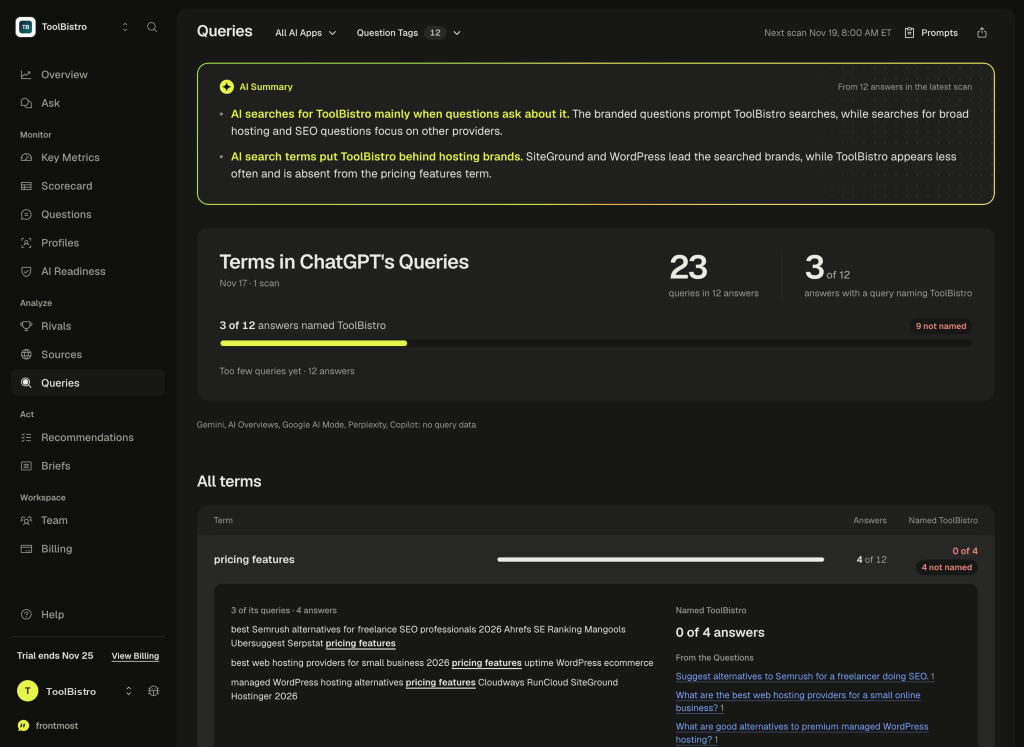
- ChatGPT search peeking (Queries): Reveals the actual web search phrases ChatGPT typed behind the scenes before writing its answer.
- Site readability check (AI Readiness): Tests whether AI crawlers are blocked in your
robots.txtor trapped behind JavaScript your visitors see but bots miss. - Client PDF reports & AI assistant sync: Exports clean 12-page PDF reports for clients at zero extra credit cost, and lets ChatGPT or Claude read your saved findings directly.
What it does NOT do: Frontmost is a measurement and diagnosis radar. It will not rewrite your web pages, pitch journalists, or build backlinks for you automatically—and it does not show Google search volume or backlink authority the way Semrush or Ahrefs do.
Step-by-step: how to set up and read your first audit on toolbistro.com
We audited a live 72-answer scan for toolbistro.com (12 questions run across 6 AI apps in the U.S. market) to walk through how an operator should actually use every screen—and avoid rookie mistakes.
Step 1: Run the free 10-second site readability check first
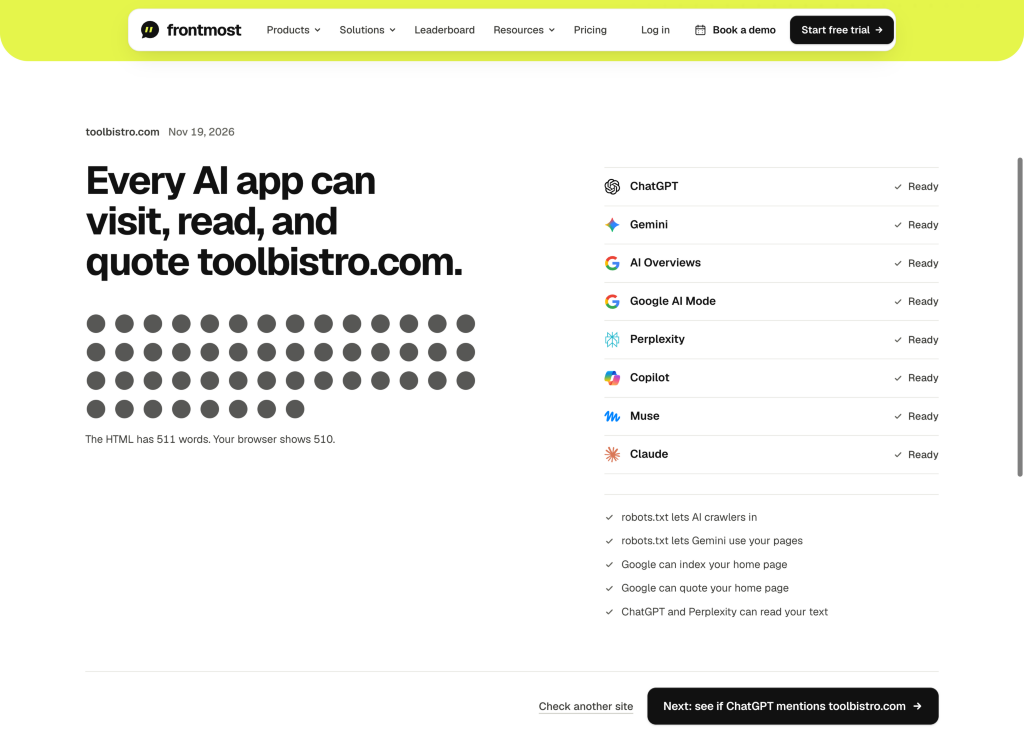
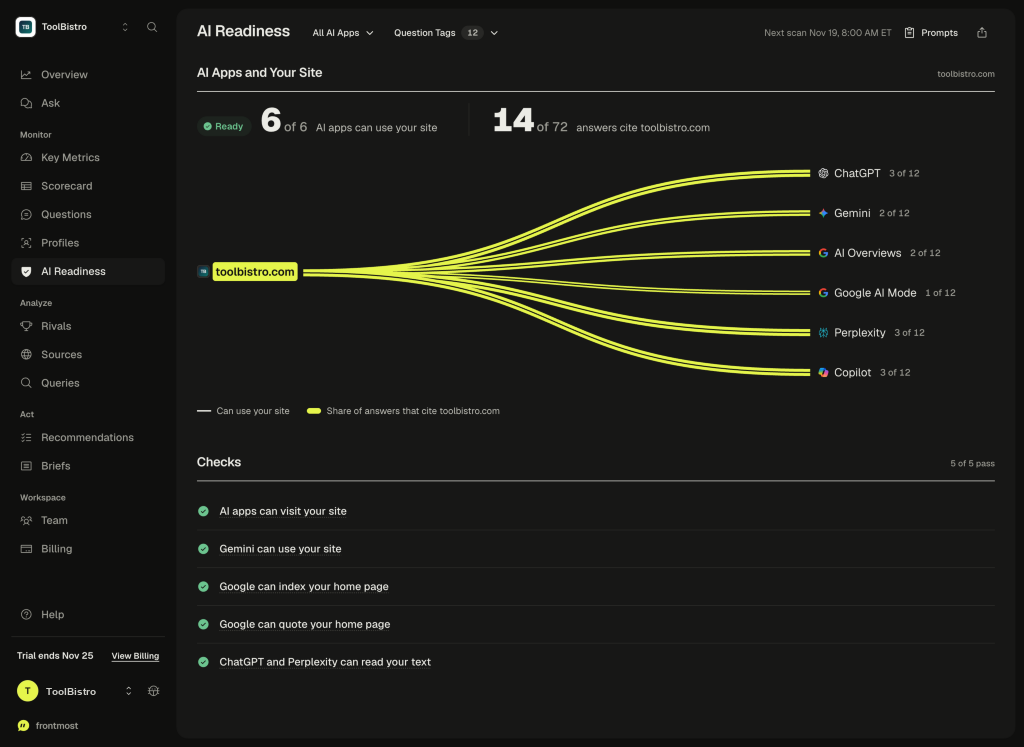
Before paying a cent, open Frontmost's free public checker (frontmost.ai/check) and type in your domain. It confirms in seconds whether ChatGPT, Google, Perplexity, Copilot, Meta Muse, and Claude can visit, index, quote, and read your homepage without executing JavaScript. Inside our workspace check, toolbistro.com passed all 5 gates with 511 words in raw HTML versus 510 words in the browser, proving AI bots see the same text a human reader sees.
Step 2: Write real buyer questions—and separate them from your brand name
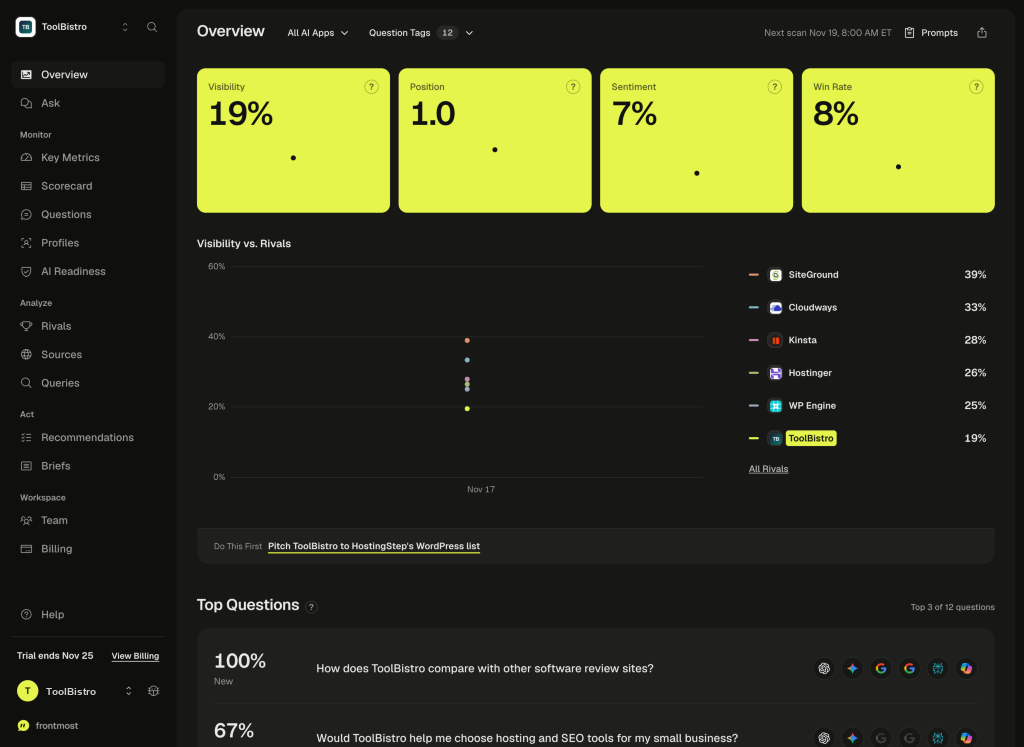
This is the single most important habit in Frontmost. When we opened the Overview dashboard for toolbistro.com, the headline card looked encouraging: 19% Visibility, 1.0 average Position, and 8% Win Rate.
Clicking the Questions tab exposed the real story. Three questions in our test set mentioned ToolBistro by name ("Would ToolBistro help me choose hosting..."), which scored 78% visibility. Meanwhile, all nine real buyer questions that did not mention our name—covering web hosting, WordPress, email marketing, SEO tools, and VPS hosting—scored 0% (0 out of 54 answers).
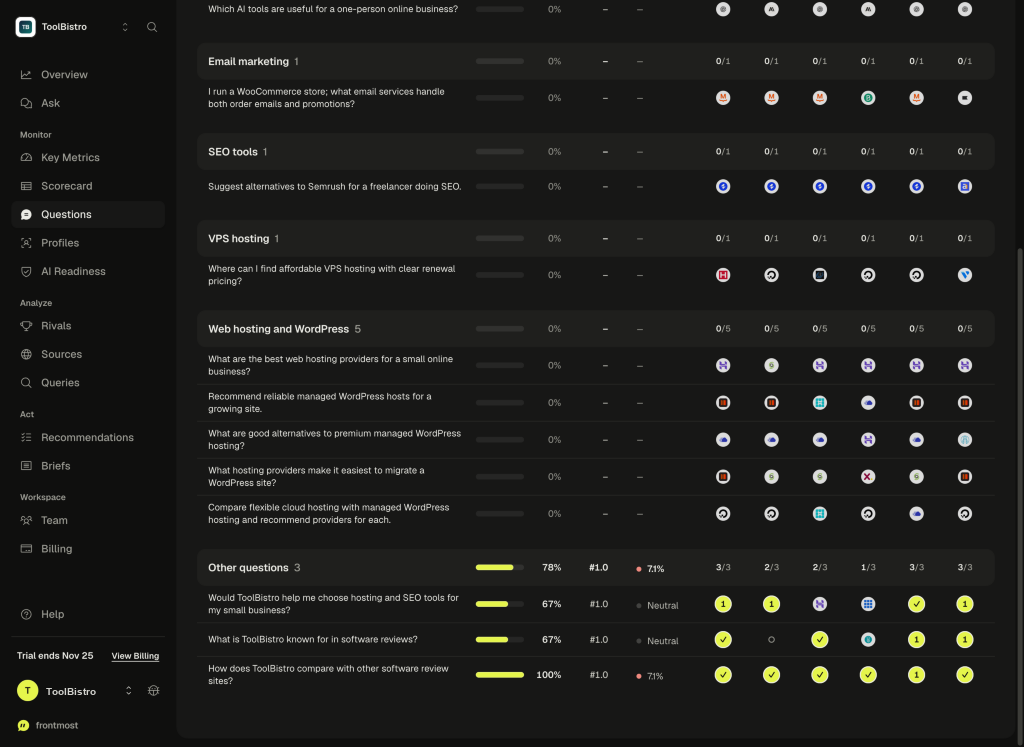
Practical setup rule: Make 80% or more of your tracked questions unbranded buyer problems (for example, "best managed WordPress host for WooCommerce" rather than "is [Your Brand] good?"). Keep branded questions tagged separately so they never disguise zero organic discovery.
Step 3: Pick standard 1-credit apps and set a sensible schedule
Inside Settings, you choose which AI engines to ask and whether scans run daily, three times a week, or weekly. Scans run overnight and publish at 8:00 AM ET. Stick to the six 1-credit apps first (ChatGPT, Gemini, AI Overviews, AI Mode, Perplexity, Copilot), where asking 12 questions uses 72 credits per scan. Leave Weekly Briefs (25 credits every Monday) off unless you want email summaries, and be aware of one workflow quirk: there is no manual "Scan now" button—if you tweak a question today, you wait until the next 8:00 AM ET run to see updated answers.
Step 4: Read the saved AI answers yourself before trusting Sentiment
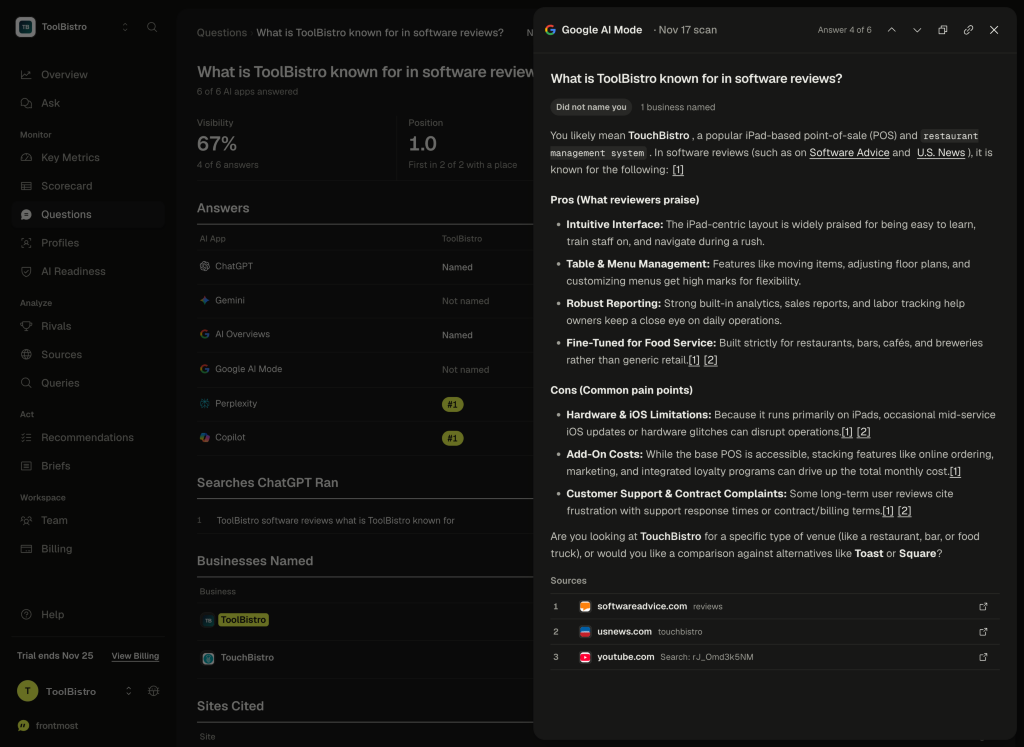
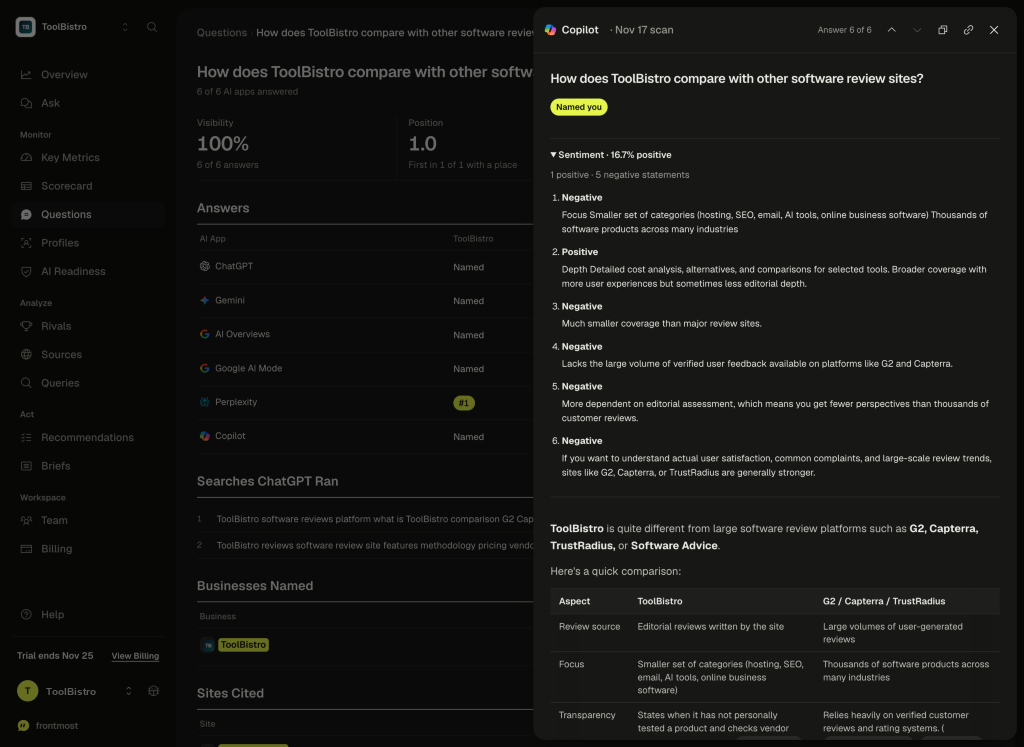
Click any question row to open the exact text each AI app returned. Reading those transcripts saved us from two misinterpretations:
- Smart brand disambiguation: Because ToolBistro sounds like restaurant POS giant TouchBistro, Gemini and Google AI Mode told buyers they probably meant TouchBistro. Even though the word "ToolBistro" appeared in those refusals, Frontmost correctly marked them as Did not name you instead of counting false mentions.
- Harsh Sentiment scoring: Our dashboard displayed a dismal 7% Sentiment score. Reading the actual Copilot, ChatGPT, and Perplexity replies showed balanced praise for pricing transparency—yet Frontmost's automated tagger marked factual comparisons like "smaller catalog than G2 or Capterra" as Negative. Always read the real transcript before panicking over a Sentiment dip.
Step 5: Turn Sources, ChatGPT Searches, and Recommendations into an action list
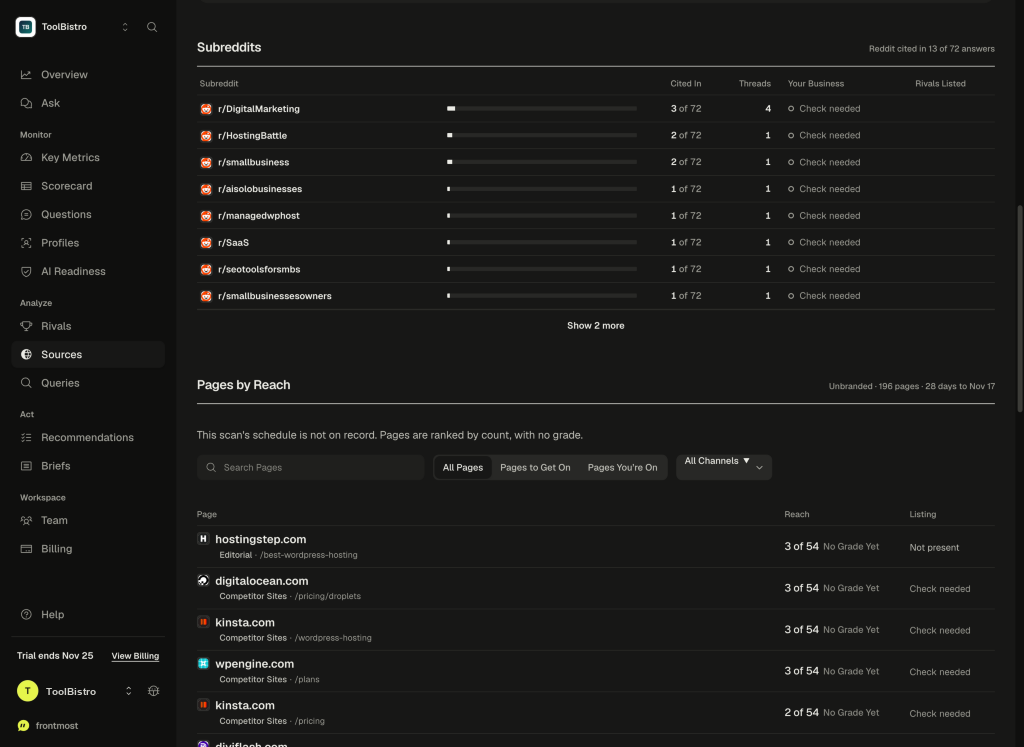
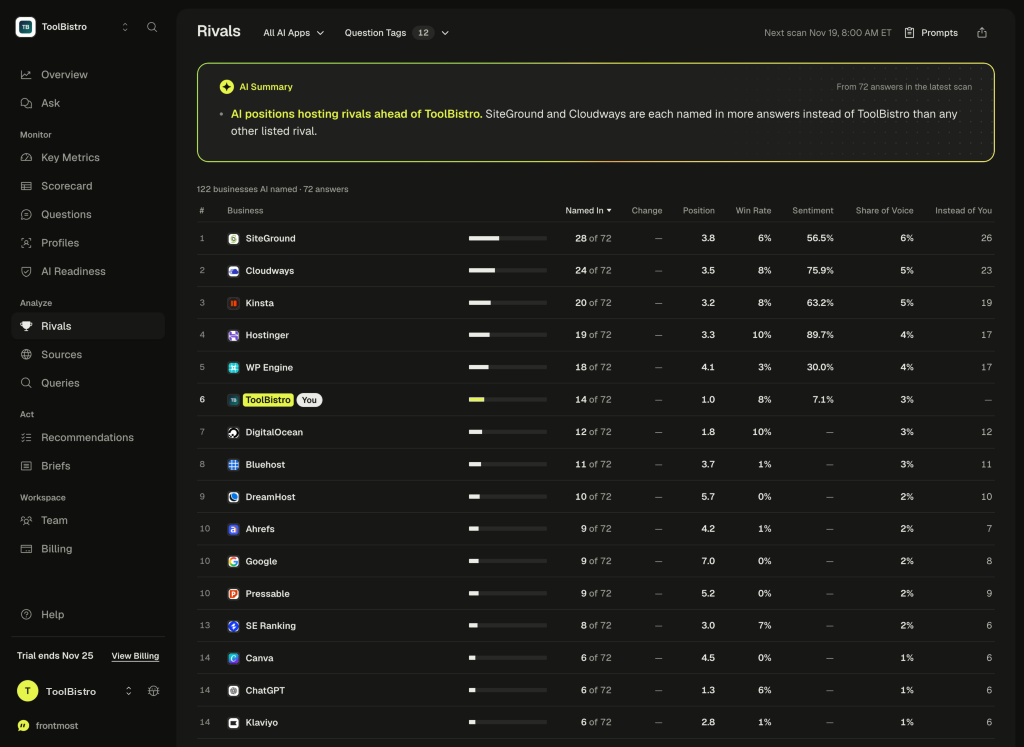
Once you finish checking raw answers, use three tabs to build your weekly marketing list—then export a free 12-page PDF via Share → Download PDF if you report to a client or team lead:
How to use Frontmost well for SEO and GEO optimization (4-step playbook)
Checking a dashboard once a week does not raise traffic. When we put Frontmost's findings on toolbistro.com side by side with our Google Search Console (GSC) logs and site codebase, a clear 4-step workflow emerged for actually winning more AI citations and organic clicks:
1. Fix Google & Bing indexing first—Frontmost cannot see unindexed inner pages
Frontmost's Readiness check confirmed all 8 AI apps could read our homepage. Yet our own Search Console audit showed a deeper problem Frontmost could not detect: dozens of inner articles lacked internal links from strong hub pages and sat at URL is unknown to Google. Because ChatGPT, Perplexity, Copilot, and Google AI Overviews search live Google and Bing indexes before answering, an unindexed inner guide can never be cited—even if your robots.txt is wide open. Always pair Frontmost with GSC sitemaps, clean crawler rules, and contextual internal links.
2. Target the 3–5 cited roundups in Sources instead of chasing random backlinks
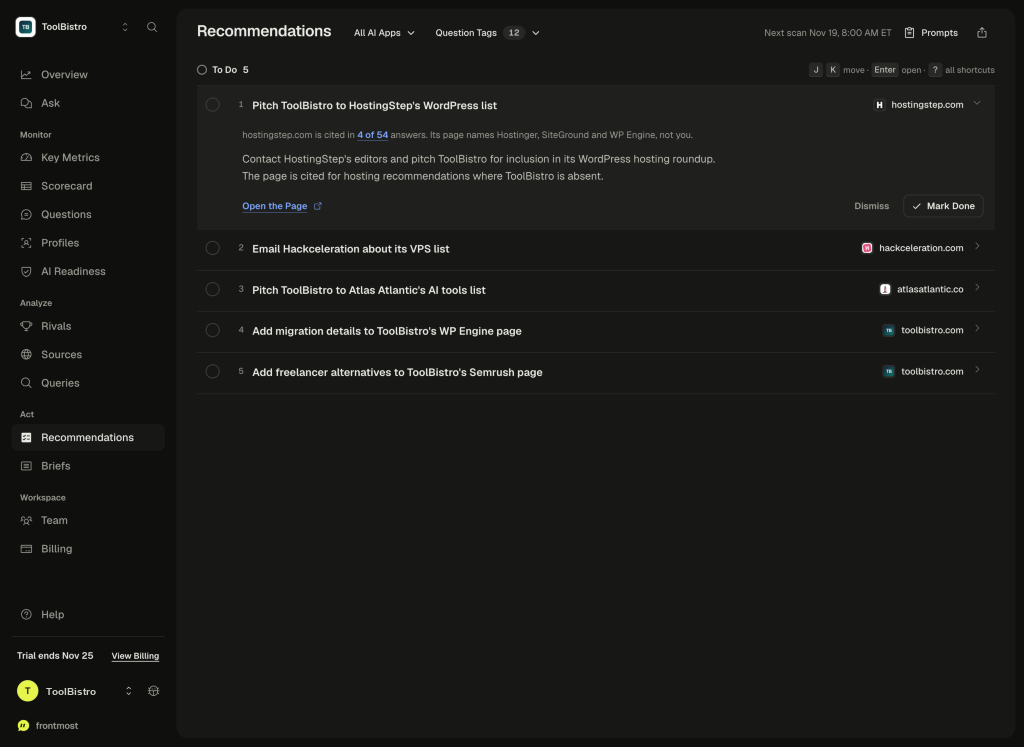
Inside Sources → Pages to Get On, Frontmost showed that hostingstep.com/best-wordpress-hosting was cited in 3 of 54 unbranded buyer answers—while marking our site Not present. Getting featured, reviewed, or honestly listed on 3 to 5 third-party roundups and active Reddit threads that AI models already retrieve moves AI visibility far faster than buying 50 low-quality directory links. One sanity check before sending outreach emails: click the cited URL in Frontmost first. In our audit, Frontmost credited softwareadvice.com under ToolBistro citations even though the cited links were actually TouchBistro restaurant POS profiles.
3. Rewrite your flagship pages using real ChatGPT Search phrases
Look closely at the Queries tab. ChatGPT did not search generic one-word keywords; it searched multi-word buyer criteria like "best Semrush alternatives for freelance SEO professionals 2026 ... pricing features" and "clear renewal pricing". When you update your site, bake those exact answers—renewal rates, side-by-side HTML comparison tables, and clear "who this fits" verdicts—directly into your primary money pages. And double-check which URL on your site you upgrade: Frontmost recommended adding migration details to our short directory card (/tools/wp-engine), whereas in our site structure, real buyer depth belongs on our full review and comparison pages.
4. Freeze your prompt list for 30 days and measure real business outcomes
AI answers naturally wobble from run to run. Keep your core unbranded questions, target country, and AI apps identical across scans so changes reflect real progress rather than prompt edits. Above all, remember that Frontmost only measures whether an AI mentions your name—check Google Search Console clicks, referral logs, and actual inquiries to prove whether visibility turns into customers.
7 practical tips to get better results (and save credits)
After auditing Frontmost AI live on toolbistro.com in November 2026 and checking its credit rules and public leaderboard data, seven simple habits separate teams that burn through credits from teams that turn scans into real traffic and citations.
1. Use the "Mon/Wed/Fri + 6 standard apps" formula—and dodge the 10-credit floor
On the $19/mo Starter plan (1,000 credits), track 10 to 12 unbranded buyer questions three times a week (~13 scans/month) across the six 1-credit AI apps (ChatGPT, Gemini, AI Overviews, AI Mode, Perplexity, and Copilot). That comes out to roughly 780 to 936 credits a month, fitting cleanly inside Starter without paying $99/mo early. Never schedule tiny 1-question daily runs: Frontmost charges a 10-credit minimum per scan, so running a single prompt on one engine wastes 9 credits every single morning.
2. Pause seasonal or test questions instead of looking for a delete button
Frontmost intentionally leaves out a delete button for tracked questions so your historical visibility curve cannot be cherry-picked later. When a seasonal prompt or wording experiment is finished, toggle it to Paused—it stops spending credits immediately (0 future credits) while preserving all past answers and trend charts.
3. Split buyer intent using free Buyer Profiles (up to 4 per project)
Instead of dumping every prompt into one giant bucket, organize questions into up to four free Buyer Profiles per project—for example, Solo Founder, Small Ecommerce Store, or Agency Team. Grouping costs 0 extra credits and quickly shows whether AI recommends you to small budgets while ignoring you for bigger agency buyers.
4. Skip pitching competitor-owned blogs in Sources
When reviewing Sources → Pages to Get On, check who owns each cited article before sending outreach emails. Rival software vendors almost never add competitors to their own comparison blogs. Put your energy into independent editorial roundups (on Frontmost's November 16, 2026 SEO Tools leaderboard, zapier.com alone was cited in 18 of 27 answers), review directories like G2 or Capterra, and active Reddit buyer threads.
5. Click any rival in Rivals to read "Answers Without You"
Do not just glance at your overall scoreboard rank. Click your closest competitor in Rivals to open the filtered list of AI answers where AI recommended them while leaving you out. Read those exact paragraphs to see what proof points—transparent renewal pricing, free migrations, or a specific integration—persuaded the model to put them in the answer.
6. Turn repeated "Negative" sentiment lines into FAQ answers on your own site
Even when Frontmost's automated classifier tags harmless tradeoffs as Negative, repeated complaint lines expose the exact doubt AI warns buyers about—such as "fewer integrations" or "higher renewal rate." Address that objection directly in a plain FAQ block and comparison table on your main product page, because AI models scan your own copy when checking whether a concern is still true.
7. Remember frontmost.ai/check tests only your homepage—and add AI attribution to your form
When we tested this exact review URL (www.toolbistro.com/reviews/frontmost-ai-review—then 3,659 visible words before adding these seven tips) inside frontmost.ai/check on November 19, 2026, Frontmost stripped both www. and the article path, testing only our 511-word root domain (toolbistro.com). Pair Frontmost with Google Search Console's URL Inspection tool and Bing IndexNow to make sure inner articles are indexed, and add "AI Assistant (ChatGPT / Perplexity / Claude)" to your signup or contact form's "How did you hear about us?" dropdown so you know which recommendations actually convert.
Frontmost AI vs. Semrush, Ahrefs, and other GEO tools: what is the difference?
Buyers often ask whether a $19/mo GEO tracker replaces a traditional SEO suite like Semrush or Ahrefs. The short answer is no—they measure completely different halves of search.
| What you need done | Semrush or Ahrefs | Frontmost AI |
|---|---|---|
| Keyword volume & difficulty | Core strength—billions of historical Google search volumes and CPCs | Not included (shows ChatGPT search phrases without volume) |
| Backlinks & site health crawl | Core strength—full site audits, broken links, referring domains | Homepage crawler & non-JS text check only |
| Multi-engine AI answer tracking | Added onto higher plans: Semrush Starter starts at $199/mo (50 daily prompts); Ahrefs Lite ($129/mo) includes 5 daily checks or Brand Radar from $199/mo | Built-in from $19/mo monthly ($15/mo annual) across 8 consumer AI apps |
| Source gaps & PDF deliverables | Domain-level AI reports without per-page outreach checkmarks on lower tiers | Flags exact third-party pages missing your brand + free 12-page PDFs |
| ChatGPT / Claude assistant sync | Limited to higher-tier or suite ecosystems | Included on every plan (even $19 Starter) with unlimited team users |
How to pair them smartly: Keep Google Search Console (free) plus Semrush or Ahrefs to find demand, fix site-wide technical SEO, and build links. Add Frontmost ($19 or $99/mo) if you want dedicated multi-engine AI monitoring, ChatGPT query insights, and client PDF reports without upgrading to $199+/mo SEO add-ons.
How Frontmost compares against dedicated GEO competitors
| GEO Tool (Entry Plan) | Monthly Price | Cost per 1,000 Answers | Where it beats Frontmost | Where Frontmost wins |
|---|---|---|---|---|
| Frontmost Starter | $19/mo ($15 annual) | $19.00 (1-cr apps) · $42.75 (w/ Claude) | — | Lowest monthly price; unlimited seats; API & ChatGPT/Claude sync included |
| Otterly Lite | $29/mo | $16.11 (4 fixed engines) | Cheaper per answer for steady daily runs ($10.19/1k on Premium) | Otterly locks API/MCP behind $189/mo Standard and bills Gemini/AI Mode extra |
| Peec AI Starter | $95/mo ($80 annual) | $21.11 (50 prompts × 3 models) | Predictable flat prompt pricing; Looker Studio on higher tiers | Nearly 5x higher entry price; API stays Enterprise-only |
| Rankscale Pro | $99/mo ($84 annual; $17 annual-only Essentials) | $20.62 (at 4 answers/credit) | Includes 10 dashboards and 50 page audits on Pro | Rankscale gates REST API to $229/mo Pro+ and charges lower allowances cleanly |
| Profound Agency Growth | $99/mo + add-ons | Not published per answer | Built for agency pitch workspaces (+ $399/mo full client add-on) | Retired brand $399/$499 self-serve plans; Frontmost is far simpler for SMBs |
| Scrunch Core | $250/mo | $50.00 (5,000-response cap) | Includes 5 site audits for larger brands | Costs 13x more upfront and restricts Core to 5 seats without an API |
Frontmost AI vs. Otterly.AI: which budget GEO tracker fits better?
Frontmost Starter ($19/mo monthly, $15/mo annual) undercuts Otterly Lite ($29/mo) on upfront price and unlocks unlimited seats, free 12-page PDF exports, and full REST/MCP/CLI access at entry level, whereas Otterly restricts API and MCP access to its $189/mo Standard tier. Otterly wins on raw unit cost if you run steady daily checks across fixed engines ($16.11 per 1,000 answers on Lite vs. Frontmost's $19.00).
Frontmost AI vs. Peec AI and Scrunch: flexible credits vs. larger team plans
Peec AI Starter ($95/mo, or $80/mo annual; $21.11 per 1,000 answers across 3 models) and Scrunch Core ($250/mo; $50.00 per 1,000 responses, capped at 5 seats) cost 5× to 13× more than Frontmost Starter and reserve API access for higher or enterprise tiers. Frontmost Growth ($99/mo, 6,000 credits across 6 projects) matches Peec Starter's price bracket while still including unlimited team members and Claude/ChatGPT sync.
Connecting Frontmost to ChatGPT or Claude (no coding needed)
You do not need to be a developer to let AI analyze your Frontmost data. Every Frontmost plan includes its connector for ChatGPT (via the official Frontmost plugin), Claude (under Settings → Connectors → add https://app.frontmost.ai/mcp), and Cursor.
Once connected, paste plain-English prompts like these into Claude or ChatGPT to turn your latest scan into weekly work:
- Find quick wins: "Check my unbranded buyer questions from the latest Frontmost scan. Which questions did competitors win without mentioning us, and which third-party articles did AI cite?"
- Draft page improvements: "Compare what ChatGPT searched and cited on [Topic] against our page at [Your URL]. Tell me what facts or comparison tables we are missing—without changing what already works."
- Track honest progress: "Compare this week's scan against last week using identical questions and engines, and show exact answer counts alongside percentages."
Why this beats just asking ChatGPT directly: A regular chat window with ChatGPT cannot see what Google AI Overviews, Google AI Mode, or Perplexity said yesterday, has no saved weekly history for your business, and often flatters your brand because of your personal chat memory. Feeding real saved scan records into your assistant eliminates guesswork without paying engineers to scrape search results.
For developers & technical SEOs: REST API, CLI, and auth architecture details
If you build internal automation or work inside Claude Code, Cursor, or terminal pipelines, Frontmost separates authentication cleanly between its two interfaces (verified via OpenAPI 3.1.0 inspection, OAuth metadata discovery, live Read Only key lifecycle tests on /team, and unauthenticated 401 protocol checks):
- REST API (
https://app.frontmost.ai/api/v1): Covers 30 paths (25 read-onlyGETroutes consuming 0 credits + 12 write operations withIdempotency-Keysupport). Authenticates using scoped Read Only or Read and Write workspace keys created in/team. - Remote MCP (
https://app.frontmost.ai/mcp): Runs over Streamable HTTP with 15 read tools (includinglist_projects,get_scan,get_answers,get_sources,get_queries, andget_readiness), 9 write tools, and 1 prompt. Uses OAuth via Frontmost's hosted AuthKit flow (or the passwordlessservice_authclaim flow documented atfrontmost.ai/auth.md) rather than workspace REST keys directly. - Official CLI & SDKs: Installable via Homebrew, npm (
@frontmost-ai/sdk), Python (pip install frontmost), or Rust (frontmost-ai). Read operations in our audit were verified from workspace UI checks, official OpenAPI/Markdown contracts, OAuth discovery (HTTP 200), and key creation/revocation checks without persisting external bearer tokens on disk.
# Connect remote MCP in Claude Code
claude mcp add --transport http frontmost https://app.frontmost.ai/mcp

# Read-only REST call for unbranded visibility (0 credits)
curl -sS "https://app.frontmost.ai/api/v1/projects/117/metrics?questions=unbranded" \
  -H "Authorization: Bearer $FRONTMOST_API_KEY"

# Install CLI and export weekly metrics JSON
curl -fsSL https://frontmost.ai/install | bash && frontmost metrics --period week --json
Frontmost AI pricing plans and how to avoid wasting credits
Unlike competitors that lock features or team seats behind expensive tiers, Frontmost sells simple monthly credit buckets. Every plan unlocks unlimited teammates, all 8 AI apps, free PDF exports, and ChatGPT/Claude connections. Unused monthly credits reset on your billing date, while extra top-up credit packs ($20 per 1,000 on Starter–Pro; $15 per 1,000 on Scale+) last 12 months. Paying annually cuts 20% off the monthly rate.
| Plan | Monthly Price | Annual Price (-20%) | Credits / Month | Projects | Best Practical Fit |
|---|---|---|---|---|---|
| Starter | $19/mo | $15/mo ($180/yr) | 1,000 | 1 | Solo site tracking ~10 questions 3x/week on 1-credit engines |
| Growth | $99/mo | $79/mo ($948/yr) | 6,000 | 6 | Small business or lean SEO team tracking 2–3 daily brands |
| Pro | $249/mo | $199/mo ($2,388/yr) | 16,000 | 16 | Agencies managing ~5 daily 12-question client projects |
| Scale | $549/mo | $439/mo ($5,268/yr) | 36,000 | 36 | Growing agencies (~12 daily 12-question projects) |
| Agency | $1,190/mo | $952/mo ($11,424/yr) | 85,000 | 85 | Multi-client SEO/PR teams |
| Enterprise | $2,490/mo | $1,992/mo ($23,904/yr) | 200,000 | 200 | Large multi-market brand portfolios |
Watch out for the 6x credit multiplier
On ChatGPT, Gemini, AI Overviews, AI Mode, Perplexity, and Copilot, 1 answer costs 1 credit—so 1,000 credits equals 1,000 real AI answers ($19.00 per 1,000 on Starter). However, Meta Muse costs 4 credits per answer and Claude costs 6 credits per answer (because Frontmost runs Anthropic's Claude Haiku with web search). Adding Claude to a 4-app daily mix immediately shrinks Starter's 1,000 credits from 1,000 answers down to ~444 answers ($42.75 per 1,000). Keep Claude and Muse turned off unless your specific buyers rely heavily on Claude for vendor research.
How Frontmost calculates its numbers (and where automated scoring slips)
Knowing what each Frontmost percentage actually counts prevents bad decisions:
- Visibility: Percentage of successful answers that name your brand. If an AI app fails to respond, Frontmost charges 0 credits and leaves that blank response out of the denominator so outages do not tank your score.
- Win Rate & Position: Win Rate shows how often AI names you first ahead of rivals; Position averages where you sit in numbered recommendations (1.0 means first).
- Citation without a name does not count: If ChatGPT drops a bare link to your site in a footnote without typing your business name in the answer, Frontmost scores that as a missed mention—though negative mentions naming your brand still count.
- Sentiment stays picky: Only clear praise or criticism counts (neutral sentences are ignored). In our test, factual limitations like "fewer user reviews than G2" got flagged Negative, pulling Sentiment down artificially.
Exact formulas, statistical change test, and engine disclosures from our PDF audit
Per frontmost.ai/method.md and llms.txt: Meta Muse answers come from Meta's Muse models with Meta web search, and Claude answers come from Anthropic's Claude Haiku model with Anthropic web search. Note that exported 12-page PDF intelligence reports enforce the two-proportion z-test above to filter random AI wobble, whereas the live web app exposes direct period-over-period comparisons.
Pros, cons, and final buying advice
Strengths
- True $19/mo entry point: Lets small sites and freelancers test AI search without committing $95–$250/mo upfront.
- Zero seat or connector tax: Unlimited team members, ChatGPT/Claude MCP connections, REST API, and CLI are open on every tier.
- Practical citation & query clues: Exposing ChatGPT's hidden search queries and missed roundup pages gives writers exact action items.
- Free 12-page PDF client reports: Exports spend 0 credits and include clear definitions and methodology.
Limitations
- No instant "Scan now" button: You wait for the overnight 8:00 AM ET queue after updating tracked questions.
- No manual Rivals cleanup: Cannot hide software vendors from a publisher's scoreboard or merge duplicate names like DigitalOcean and OVHcloud split rows.
- Harsh Sentiment classifier & no itemized billing log: Neutral scope tradeoffs drag down Sentiment, and the billing page shows credits left without a row-by-row spend history.
- Muse & Claude burn credits fast: 4x and 6x credit multipliers require strict engine discipline on Starter and Growth plans.
Bottom line for SEO & GEO work: If you already run Search Console and a core SEO suite like Semrush or Ahrefs—and want an affordable radar to see whether AI assistants actually recommend your business, which roundup articles to pitch next, and what ChatGPT searches behind the scenes—Frontmost Starter ($19/mo) or Growth ($99/mo) is easy to justify. Skip it (or pick Otterly Premium instead) only if you need massive 400-prompt daily runs at the lowest possible unit price ($10.19/1k) or need strictly curated enterprise competitor boards.
Frequently asked questions
Can Frontmost AI replace Semrush or Ahrefs for SEO?
No. Frontmost tracks what AI assistants say and cite, whereas Semrush and Ahrefs give you keyword search volume, backlink indexes, and full-site technical crawls. Use Search Console plus an SEO suite to get your pages indexed and linked, and use Frontmost to see why AI answers pick competitors instead of you.
How should I set up questions so Frontmost gives useful data?
Write 80% or more of your questions as unbranded buyer queries (problems a customer types without knowing your company exists) and tag branded questions separately. As our live test proved, mixing branded queries into one total can hide 0% buyer discovery behind a 19% overall score.
Is there a free plan or free trial on Frontmost AI?
There is no permanent free tracking tier. Frontmost offers a free public crawler health check (frontmost.ai/check), three one-time sample ChatGPT answers on its homepage, and a 7-day public free trial up to 1,500 credits that requires a credit card at checkout and renews automatically.
How many credits do I actually need on Starter ($19/mo)?
If you track 10 buyer questions three times a week (~13 scans/month) across 6 standard 1-credit AI apps, you spend roughly 780 credits a month—fitting comfortably inside the $19/mo Starter plan's 1,000 credits. Just leave Claude (6 credits) and Muse (4 credits) unchecked.
Are ChatGPT, Claude, and PDF exports really included at $19/mo?
Yes. Every paid Frontmost plan includes unlimited users, the ChatGPT plugin and Claude MCP connector, REST API and CLI access, and unlimited 0-credit PDF and CSV report downloads.
Does Frontmost AI check individual blog articles or only your homepage?
In our November 19, 2026 live test, both frontmost.ai/check and the workspace AI Readiness tab normalized our inner article path back to our root domain—counting our 511-word homepage even when given our multi-thousand-word review URL (3,659 visible words at initial test time). Use Frontmost for domain crawlability and pair it with Google Search Console and IndexNow to verify individual article indexing.
Frontmost AI vs. Otterly.AI vs. Peec AI: which should a small team pick?
Pick Frontmost Starter ($19/mo) if you want the lowest monthly entry cost, unlimited team access, and ChatGPT/Claude MCP sync out of the box. Pick Otterly ($29/mo Lite, $189/mo Standard) if you run fixed daily prompt schedules at lower per-answer unit cost, or Peec AI ($95/mo) if you prefer predictable 50-prompt bundles over credit math.
Related reading on ToolBistro
Sources
- Frontmost AI official website (reviewed November 18, 2026)
- Frontmost AI pricing & per-engine credit rates (verified November 18, 2026)
- Frontmost AI measurement methodology
- Frontmost AI ChatGPT & Claude connector guide
- Frontmost AI REST API documentation
- Frontmost AI Terms of Service (trial & renewal terms, updated November 14, 2026)